Lawyer Assistant
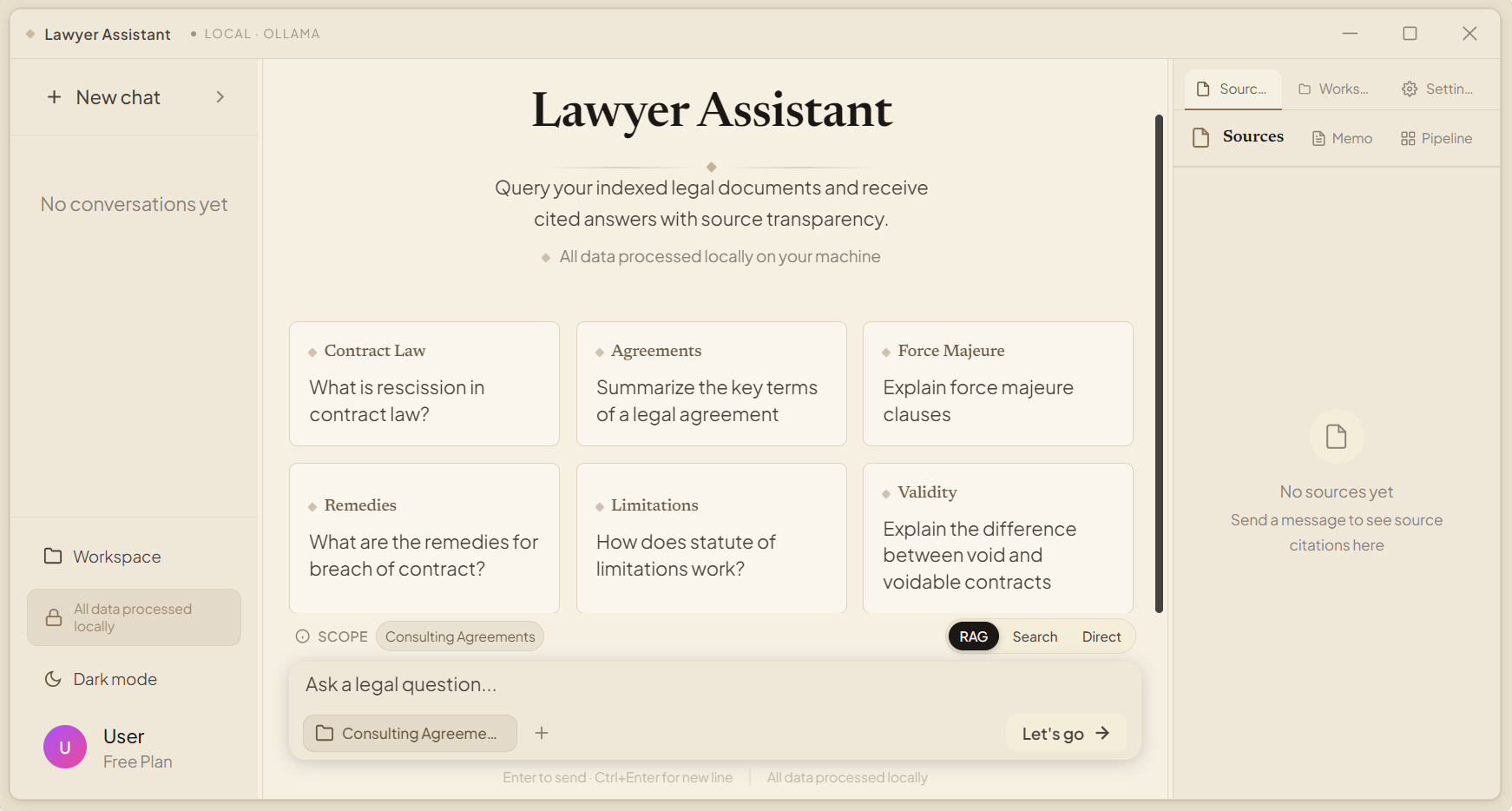
A desktop app that searches, analyzes, and answers questions about your legal documents — entirely on your machine. Point it at a folder of PDFs, contracts, or scans, and ask questions in plain English. Every answer cites the exact source passages it came from.
Up and running in three steps
Download the app
Grab the installer or archive for your platform below (~100 MB).
Run the launcher and click Install
It sets up Python, downloads the AI models, and installs everything you need — one time only. See the install guide for details.
Pick a folder and ask a question
Select a project folder, let the app index your documents, then ask in plain English — answers come back with inline citations to the sources.
Direct links to the latest release
Pick your platform and go. Unsure what to choose? Start with the install guide.
Windows
Setup installer for Windows 10 & 11. If SmartScreen warns, click More info → Run anyway.
Download .exemacOS
Universal archive — extract it and run launch.sh. If Gatekeeper warns, right-click → Open.
Linux
AppImage — no install needed, just run it. Prefer the installer? Grab the tar.gz below.
First run downloads the AI models, so have an internet connection ready. All releases · Source on GitHub
Features
Natural-language search
Ask questions in plain English instead of guessing keywords. Works across contracts, regulations, court decisions, policies, and scanned documents.
Answers with citations
Every answer is grounded in retrieved passages. Inline citations link straight to the source file so you can verify before you rely on it.
Compliance scanning
Define your own rules — jurisdictional, formatting, disclosure — and scan any document against them. Violations are flagged and explained.
Hybrid retrieval
Semantic understanding and exact keyword matching, fused and re-ranked, so shorthand, typos, and paraphrases all find their target.
Private by default
In local mode your documents never leave your computer. Everything — parsing, indexing, search, answer generation — runs on your own hardware.
Windows, macOS, and Linux
One app across all three platforms. Works offline with local models, or with your own API key if you prefer cloud models.
Frequently asked questions
What is Lawyer Assistant?
Lawyer Assistant is a free, open-source, local-first AI legal research tool that helps users search, analyze, and ask questions about legal documents using natural language. It retrieves relevant passages from document collections and generates answers with citations to the original sources.
How does Lawyer Assistant perform legal document research?
Lawyer Assistant indexes legal documents, retrieves relevant passages for a user's question, and generates an answer based on the retrieved sources. The response includes citations so users can verify the information against the original documents.
What types of legal documents can Lawyer Assistant analyze?
Lawyer Assistant can analyze contracts, regulations, statutes, policies, compliance documents, court decisions, legal opinions, case files, and other text-based legal materials.
Does Lawyer Assistant provide citations and source references?
Yes. Lawyer Assistant provides citations to the source passages used to generate an answer, allowing users to review the referenced text and verify findings against the original documents.
Can Lawyer Assistant run completely offline?
Yes. Lawyer Assistant supports fully offline operation when used with local AI models. Document indexing, retrieval, embeddings, and answer generation can run without an internet connection.
Is Lawyer Assistant a private alternative to cloud-based AI tools?
Yes. In local mode, Lawyer Assistant processes documents, searches, and answer generation on the user's computer. Documents and queries are not sent to external AI services when using local models.
Does Lawyer Assistant use retrieval-augmented generation (RAG)?
Yes. Lawyer Assistant uses a retrieval-augmented generation (RAG) workflow in which relevant document passages are retrieved and provided as context for answer generation.
Which operating systems does Lawyer Assistant support?
Lawyer Assistant supports Windows, macOS, and Linux.
What are the hardware requirements for Lawyer Assistant?
Lawyer Assistant runs on most modern computers and has been tested on systems with as little as 8 GB of RAM. The AI models load into a few gigabytes of memory; a GPU with 8 GB+ VRAM makes document indexing noticeably faster, and the launcher automatically installs a CUDA-accelerated build when it detects an NVIDIA card.
Is Lawyer Assistant open source?
Yes. Lawyer Assistant is free and open source under the MIT License, allowing users to inspect the source code, contribute improvements, deploy the software locally, and customize it for their own legal research workflows.
Can law firms and legal teams use Lawyer Assistant?
Yes. Lawyer Assistant is designed for legal professionals, researchers, compliance teams, and organizations that need to search and analyze legal documents while maintaining control over their data.
How is Lawyer Assistant different from a general AI chatbot?
General-purpose AI chatbots are designed for broad conversations, while Lawyer Assistant is designed to search and analyze a user's legal document collection. Lawyer Assistant retrieves relevant passages from the documents and generates answers based on those sources with citations for verification.
Learn more and get involved
Install guide
Step-by-step setup for every platform, including SmartScreen and Gatekeeper notes.
Documentation
Architecture, API reference, retrieval pipeline, GPU management, and more.
Blog
Plain-spoken essays on legal research, AI, and the practice of law.
Source code
Browse, fork, and build it yourself — free and open source under the MIT License.
Report an issue
Found a bug or want a feature? Open an issue on GitHub.
Releases
All versions, checksums, and release notes on GitHub.
Lawyer Assistant is a legal research and document analysis tool. It does not provide legal advice, does not replace a qualified lawyer, and should not be relied upon as a substitute for professional legal judgment. Always verify AI-generated information against the original legal sources.